Issue Management in Project Management
We all recognise the crucial role of good issue management in project management, yet executing it effectively can be a challenge. In this article, we look at the differences between issue and risk management, and focus on strategies for impeccable issue management within your organisation and project teams.
What is an issue?
An issue is a project risk that has escalated into a current problem. Ideally, your team will have identified all the risks which could negatively impact your project in the planning phase. If your team was thorough in the planning phase, you may have already anticipated the issue, and have a mitigation plan ready.
Issues can have varying degrees of impact. An issue may only influence the short-term progress of your project, or it may impact overall project success. The defining characterisic of all issues is that they form a materialised problem with negative implications.
It’s important to emphasise that an issue is always current. Therefore, issues differ from risks, and require decisions to be made.
- Risks are potential problems that have not truly manifested. Therefore, project managers should monitor them, and manage them through a risk register.
- When project managers make decisions to resolve problems, the decision itself is not an issue. However, if the project manager puts off making a decision, it will likely evolve into an issue.
What is Issue Management?
Issue management is the process of monitoring, analysing, and prioritising issues through set processes and structures. The ideal outcome of issue management is the successful mitigation or resolution of the issue itself.
Risk management vs Issue Management
We can think of issue management as the step after risk management. Project managers use risk management to identify potential problems pre-emptively. Effective risk management ensures the project manager can resolve the risk before it occurs, or prepare for the its occurrence. An issue, by nature, is a current problem, and often project managers approach it in a reactionary way.
Why is Issue Management Important?
Issue management is valuable because it maintains project stability and efficiency throughout the project lifecycle. A project manager needs be hyper-aware, flexible, and agile to respond appropriately to any issues. The balance of agility and accuracy is key: because the issue has eventuated, there is a smaller margin for error, and limited time to act. Teams use analysis and response frameworks which have been designed to respond promptly to issues. This, of course, minimises the negative impact of the issue on the project.
Issue management is becoming increasingly important in our digitised and fast-paced society. Especially in the age of social media, mishandling or ignoring issues can attract much negative attention. While not all issues are media-worthy, it is important to have a robust framework that minimises any impacts of the issue.
Issue Management Process
Issue management frameworks or processes will vary from organisation to organisation. However, there are five key components to an effective process.
Step One: Identify and document issues
The first step in issue management is to identify the issues at hand. Project managers should look over issues and risks which are being currently monitored, and assess whether there are any issues which have gone unidentified.
Teams who make an active effort to identify problems in the planning stages are therefore much more likely to catch issues early. Project managers then evaluate if these problems are indeed issues, and document them in an Issue Log.
The Project Management Institute recommends applying a formal structure to clearly define the issue and its impacts. Their proposed format is:
“Given that has occurred, the current status , affecting as follows .”
For example:
“Given that the product technical designer is unable to agree on the specific technical solution (the issue), the current development sprint has been halted (current status), affecting the project timeline, cost and product scope (project objectives) in a way that is threatening the entire project (impact)”
Step Two: Analyse and prioritise the right issues
Once project managers have identified all issues, they can analyse, evaluate, and prioritise them. An issue matrix is a valuable tool teams can use to evaluate the severity of an issue. While a risk matrix often considers the probability of occurrence as a critical measure, an issue matrix focuses more on the amount of time needed to resolve an issue before it negatively impacts overall project success.
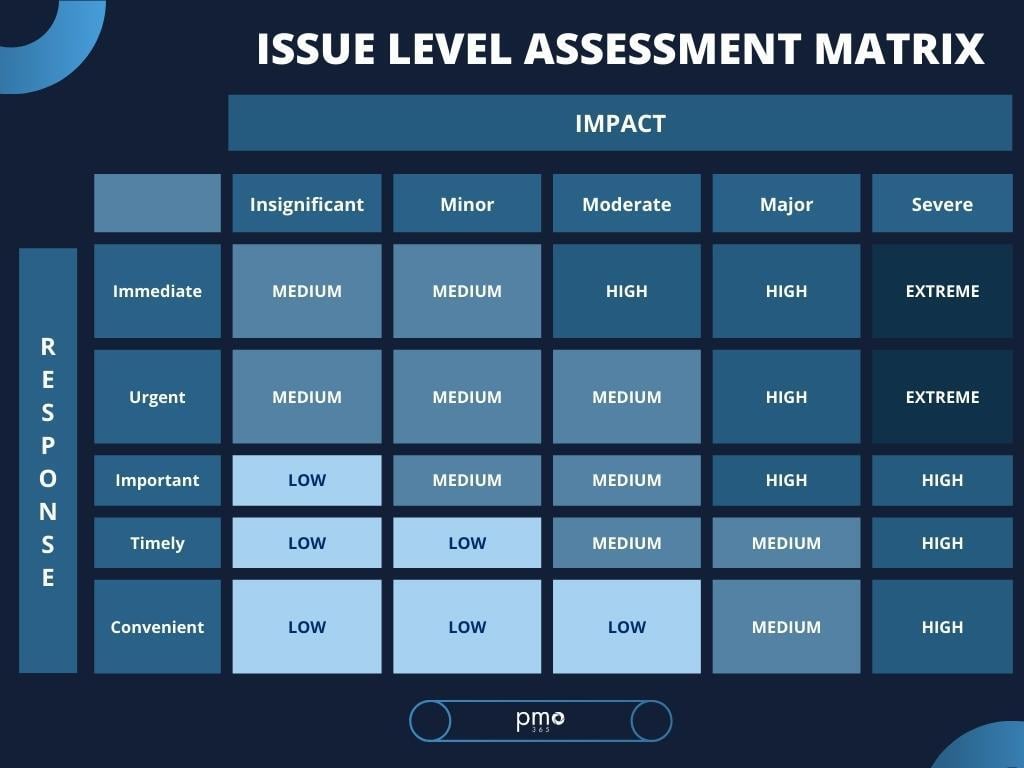
Teams may define the exact time ranges for each associated level, however, the typical definitions for each level are:
- Immediate: requires a resolution within the next 5 working days or project success will be negatively impacted
- Urgent: requires a resolution within the next 10 working days or project success will be negatively impacted
- Important: requires resolutions within the next month or project success will be negatively impacted
- Timely: requires a resolution within the next month or other activities within the project will be disrupted
- Convenient: decision can be withheld for more than one month
With the help of this matrix, teams can easily allocate an issue-level rating to each individual issue. From there, they can prioritise issues by those which will have greatest detrimental impact on the project’s success.
Step Three: Create an issue action plan
This is where the bulk of the plan lies. While some of the issue plan can be a handover from risk management, you should ensure your organisation has clear handover guidelines in place. This is particularly important if the person who didn’t write the risk assessment is managing the issue. During this step it is important to assign an issue owner to the issue. Their responsibility is to monitor the issue’s progress, keep track of actions, and provide stakeholders with status updates.
To create an issue action plan teams will need to:
- Set a solution deadline
- Determine what resources or stakeholders are required
- Outline the steps to resolve the issue
- Add the issue action plan to the general project management plan
- Align all actions with other project activities
- Ensures your issue action plan won’t cause further issues
Step Four: Monitor progress and execute the issue action plan
Once a project manager defines and assigns the action plan, they should track the ensuing actions. If you’re following a typical monitoring process, the issue owners will monitor these actions for any emerging risks. Issue owners will be tasked with reporting, managing, and closing the issue they are responsible for.
Step Five: Review and improve the issue management process
At the end of each issue resolution, it is important to review the actions made. You might identify opportunities where processes can be optimised, or actions can be completed differently. Teams can produce an issue register that logs all issues and their resolution. We strongly recommend using RAID Logs (Risks, Assumptions, Issues, Decisions) as an issue register, as it allows teams to reference previous action plans. Whatever issue log you use, it can assist you in evaluating how much control the team has over project success. If there are too many issues arising, teams may have an inadequate project planning framework. With this knowledge, you can improve frameworks to prevent projects experiencing continuous issues.
Simple ways to ensure your issue management is successful
Issue management can seem overwhelming. However, keeping some key considerations in mind can ensure your issue management is successful:
- Report issues early, and check them frequently.
- Use an issue management solution with real-time data.
- Define a clear escalation process.
- Use a colour coding system- traffic lights (red/amber/green) is our favourite.
- Learn from historic data, and refine your issue management processes accordingly.
Take your risk and issue management activities to the next level with pmo365
With our intuitive RAID logs and integrative system, pmo365 can consolidate all your project-related activities onto a single platform. This ensures you always have the most accurate data on hand, which informs your risk and issue management actions and helps you continuously and accurately monitor performance. Learn how pmo365 does this with our free trial.