Beginners Guide to Power Virtual Agents
One of the key artificial intelligence technologies that is becoming increasingly popular are chatbots. But building chatbots is no easy feat, often requiring the expertise of experienced programmers and AI teams. Microsoft has made your chatbot-building dreams easier than ever with Power Virtual Agents. This is your guide to Power Virtual Agents! We’ll walk you through what they do, how they works, and the top 4 reasons why your business needs it!
What are Power Virtual Agents?
Power Virtual Agents is a service within Microsoft Power Platform suite. It focuses on enabling the easy development and management of fully functional bots through a no code approach. With a graphical, easy-to-use interface, it allows users with virtually zero programming or AI experience to build smart bots.
Additionally, Power Virtual Agents specialise in integration. This means you can tap into all Microsoft 365 apps and external data sources through Microsoft connectors. This means that smart bots can be fully integrated to your workflows and platforms with minimal barriers and restrictions. Naturally, this facilitates for the automation of activities across the breadth of the businesses activities.
How do Power Virtual Agents work?
We tend to think of bots as all knowing technological gods that can pull an answer out of thin air. The reality is that bots are a chain of responses that is triggered based on the data that is input. Think of it as a choose your own adventure game. Just like each choice you make in that book leads to a specific set of additional questions until you reach the intended end goal. Now accelerate that process to lightning speeds and you get the almost instantaneous responses of smart chatbots today.
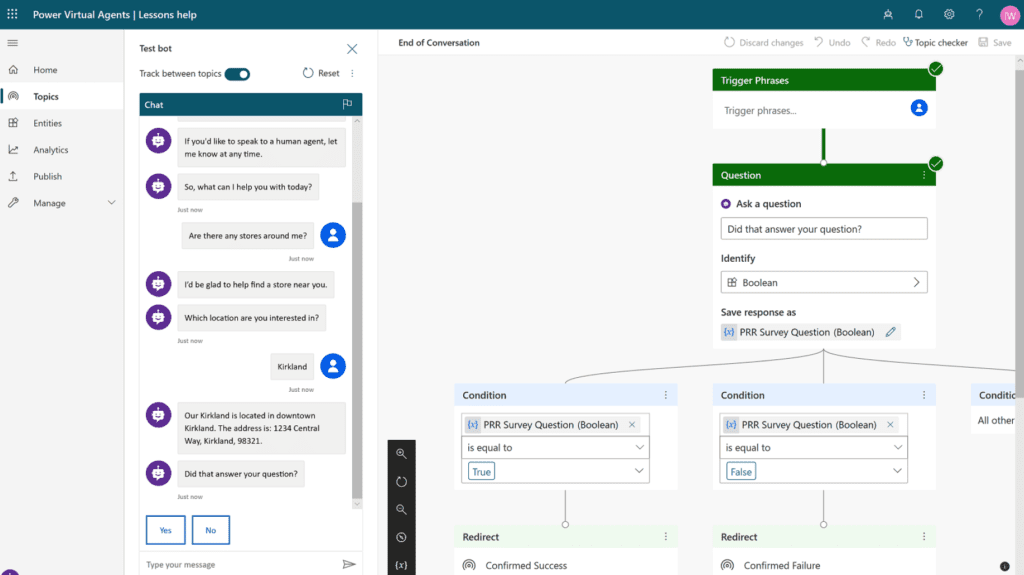
Building bots can be tedious but they have never been easier with Power Virtual Agents. The easy-to-use interface allows you to create straightforward and simple flows to answer questions easily. Power Virtual Agents help you get started through their pre-made topic categories in their suggested flows. You can easily edit to your needs from watching a quick video tutorial. From that basis, you can build your own chatbot.
Top 4 Business Benefits of Power Virtual Agents
1. Easy to build, measure and improve
The no-code graphic interface makes building a chatbot possible even with zero programming, coding or artificial intelligence experience. To begin with, there is an extensive community with bot-building insights. However, within the Power Platform, the Agents include intutive in-build suggestions which help users navigate the capabilities of the platform. Additionally, intuitive dashboards allow users to easily monitor and continuously improve their chatbots through data-driven insights and AI.
2. Reduces costs
By automating common inquiries both internally and externally, chatbots help free up human agent time for more complex and value adding activities within the business. Additionally, chatbots are less likely to make mistakes which also reduces costs in the long term.
3. Improves customer satisfaction
We all hate being put on hold for hours with horrible elevator tunes playing. With chatbots, you can answer and resolve customer issues 24/7. Customers also feel more empowered as they get their answers through a ‘self-help’ format.
4. Integrates and automates process across the business
Power Virtual Agents integrates seamlessly with everyday products and services through hundreds of inbuilt connectors, allowing users to deploy their chatbots across their websites, social media, Microsoft apps and more with ease. Additionally, it can also build custom workflows to integrate your chatbots with Power Automate as well as tap into more complex scenarios with Microsoft Bot Framework.
We can Guide You through Power Virtual Agents
Power Virtual Agent is a premium Microsoft 365 application and currently runs at a base price of $1000 per month for 2000 sessions. Additional session additions can be purchased if required. On its own, this may sound like a hefty price, but Power Virtual Agents is best optimised when used in tandem with the entire Microsoft Power Platform suite.
Lucky for you, our PPM experts are Power Platform Pros! Book in a chat with our PPM experts to see how you can make the most of Power Virtual Agents and the Power Platform for your business. If you want to learn more about these tools, make sure to read our comprehensive guide to Microsoft Power Platform.