Solving Project Governance Diversity with Core/Core+
Key Points:
- Diversity in project governance is a valuable quality.
- EPMOs, however, require consistency and visibility across the entire enterprise.
- Resistance to ‘single platform’ enterprise solutions is high.
- Microsoft’s Power Platform integrates with many different apps but lets you route all data to a ‘single source of truth’.
- pmo365 configures the Platform to manage Core (or enterprise-level) data fields for PMO reporting and real-time project management across all divisions.
- Each division has ‘Core+’ (or local) data fields which serve its own project methodologies.
- A Core/Core+ strategy for PPM creates consistency and visibility in enterprise reporting while supporting diversity in project governance and methodologies.
The Need for Consistency and Project Governance Diversity
Traditionally, organisations acquiring new Project and Portfolio Management (PPM) software wanted to standardise all the data fields coming in from each division to the PMO. This was driven by the need for consistency in reporting and visibility across the enterprise. The only way it felt it could do this was by making all project management data fields exactly the same for every division. It’s a reasonable assumption; there’s often hundreds of different projects being managed at the same time. But it’s a self-defeating logic that frequently ends in failure.
Business units engaged in project delivery try to do the right thing for a while; users dutifully fill in the requisite fields on the brand-new platform. But, before long, some start reverting to their own sheets and apps. They dutifully transfer the data each week, or month, for corporate reporting. Ultimately, however, the new software – adding a new layer of admin and/or learning to every project division – becomes just too great a burden. Compliance wanes, errors appear, and data soon starts to get lost entirely.
It’s easy to blame the division. Surely, they appreciate the need for accurate enterprise reporting? How else can we track the success of portfolios and conduct strategic planning?
But reporting is not the main responsibility of project departments, after all. Those departmental managers and PMO’s have probably spent years developing methodologies and governance procedures that serve them well. And who has time for all that extra work? So, clearly there’s got to be a better way to manage diversity in project governance. But what is the right solution for consistency and compliance at an enterprise level?
Microsoft’s Power Platform
Up until now, the only way you could get visibility across an entire enterprise was the ‘top down’ approach to project portfolio management. That meant basically having the PMO force all its business units to adopt the same stages and gates in their reporting, regardless of the type of work involved.
With the rise of PPM software and real-time cloud-based data, the imperative for consistency in reporting has become greater still. However, there is a new approach, made possible by the vast capabilities of cloud-based systems like Microsoft’s Power Platform, which incorporates a little less of the ‘top down’ and a little more of the ‘bottom up’ approach to project delivery.
Now, it’s possible to let each department work in its own way whilst gathering vital, enterprise-level data from across the portfolio.
What is Core / Core+?
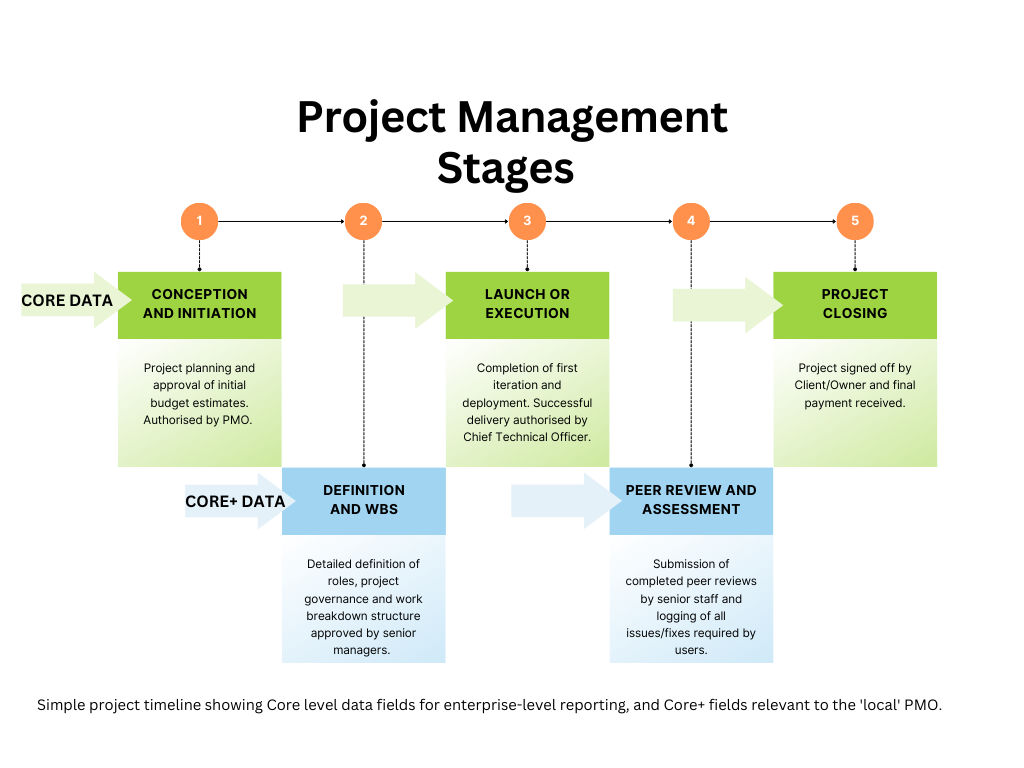
‘Core data’ is all the essential enterprise-level information required for project portfolio management reporting and analysis. This serves overarching project governance imperatives for the EPMO and key stakeholders. Core+ data, therefore, represents all that additional reporting which serves project delivery at an operational level, or each PMO’s own project methodology.
Projects can have any number of gates and stages, each with its own division of tasks, governance, and approvals. Every department engaged in project delivery has individual naming conventions and methodology; for example, ‘initiation, planning, execution, closing, handing over’ might make sense for an IT division’s project timeline, but the stages for delivery in building and construction might look very different.
The Key to Project Governance Diversity
Therefore, some departmental gates and stages will be relevant to ‘Core’ governance and reporting, others will not. Those outside the scope of Core governance, but essential to the division’s project methodology, are called ‘Core+’ stages (or data fields). In our project management solution, pmo365, you can direct both Core and Core+ fields from every division to the powerful data exchange at the centre of the Microsoft Power Platform.
Accordingly, the Power Platform lets you route all data fields from every facet of operations to a single, secure location called the ‘Dataverse’. Here, enterprise level, ‘Core’ data, is mapped for reporting and dashboards whilst Core+ data is retained for reporting to each division. The only fields that need to have the same name are the Core fields. Between those, you can have any number of additional gates and stages as your project division requires.
Introduce. Integrate. Replace.
The Dataverse is the first element deployed to your pmo365 work environment on the Power Platform. A basic project management app routes Core data to the Dataverse. This sits at the centre of each division alongside its existing apps. The Dataverse becomes your enterprise’s central knowledge exchange, instantly updating all available enterprise data as it happens.
Then, the entire pmo365 library of Apps, Flows, Reports and Dashboards is deployed. The pmo365 Solution Library is a comprehensive and continually growing collection of cloud native software specifically designed to manage large and complex project portfolios and provide useful tools for strategic analysis.
Integration involves tailoring a unique solution for each project division. That includes identifying the Core+ fields that record and manage project delivery at the departmental level. The creation of each division’s work environment, including Apps, Flows, Reports and Connectors, involves making all the Core data automatically available for enterprise reporting.
What are Connectors?
The Power Platform’s Connectors permit the integration of your work environment with over 900 Microsoft and non-Microsoft apps for seamless visibility and control. Users can take advantage of PMO365’s latest best-practice PPM tools or keep using the apps they’re familiar with. In either case, all enterprise data routes to the ‘single source of truth’ in the Dataverse.
Only at this point will pmo365 commence the process of removing apps that are no longer required. By this time, your PPM solution will have been thoroughly tested and customised to your work environment. Project management and enterprise-level data are now seamlessly connected in real-time. PMO365’s subscription model then lets clients switch between self-managed, co-managed and fully managed solutions at any time for one monthly, all-inclusive fee.
The Benefits of Diversity in Governance
- Different departments want to work on their roles with the best tools available. These days, one software solution for everything is just unworkable, and probably not all that productive. You can’t afford to risk your governance framework on sub-standard project management software.
- Increasingly, large software providers recognise that flexibility brings value to project delivery. Developers understand that users have a diversity of needs and preferences when it comes to performing their roles at maximum efficiency.
- Better functionality creates stronger collaboration. The highly customisable Power Platform on Microsoft 365 allows users to develop their own tailored management solution with virtually unlimited connections and integrations of third-party apps. It also provides visibility and security by saving all user data to the organisation’s Microsoft 365 cloud tenancy. Most businesses (some 95%) already use and trust Microsoft products, and the Platform extends its business offering with extraordinary functionality.
- Experience and a broad perspective is essential for good management. When managing project portfolios, pmo365 is the ready-to-go premier Power Platform solution offering a comprehensive library of apps and business tools – developed from 15 years working with PPM in industry. As a Microsoft preferred provider, pmo365 retains diversity in project governance, fosters greater efficiency and collaboration, and guarantees real-time, enterprise-level data for high-level visibility and control.
The PPM Solution for You
pmo365 is a unique PPM solution, deployed to your Microsoft 365 cloud, which improves consistency in reporting and overcomes resistance to enterprise-wide portfolio management at the divisional level. pmo365 democratises the PPM framework by tailoring unique software solutions for each project management office.
It does this by proscribing ‘Core’ data fields for PMO reporting and governance, but also retaining the diversity of project methodologies and data coming from all the departments engaged in project delivery. pmo365 integrates with hundreds of Microsoft and non-Microsoft apps to source relevant data wherever it resides across the enterprise.
Find out more about pmo365 , the Project Management Office on your Microsoft 365 Cloud. Contact us today for a free demo.